Every stat that matters
Spend, tokens (including reasoning and cache), models, agents, tools, skills, projects, sessions, and errors — filterable by project and by 7d / 30d / 90d / MTD / all time.
Cost, tokens, models, agents, tools, skills, and sessions — tiled by day. A native desktop dashboard for the data opencode already keeps on your disk.
Unsigned build — Gatekeeper blocks the first launch. Allow it once under System Settings → Privacy & Security → Open Anyway.
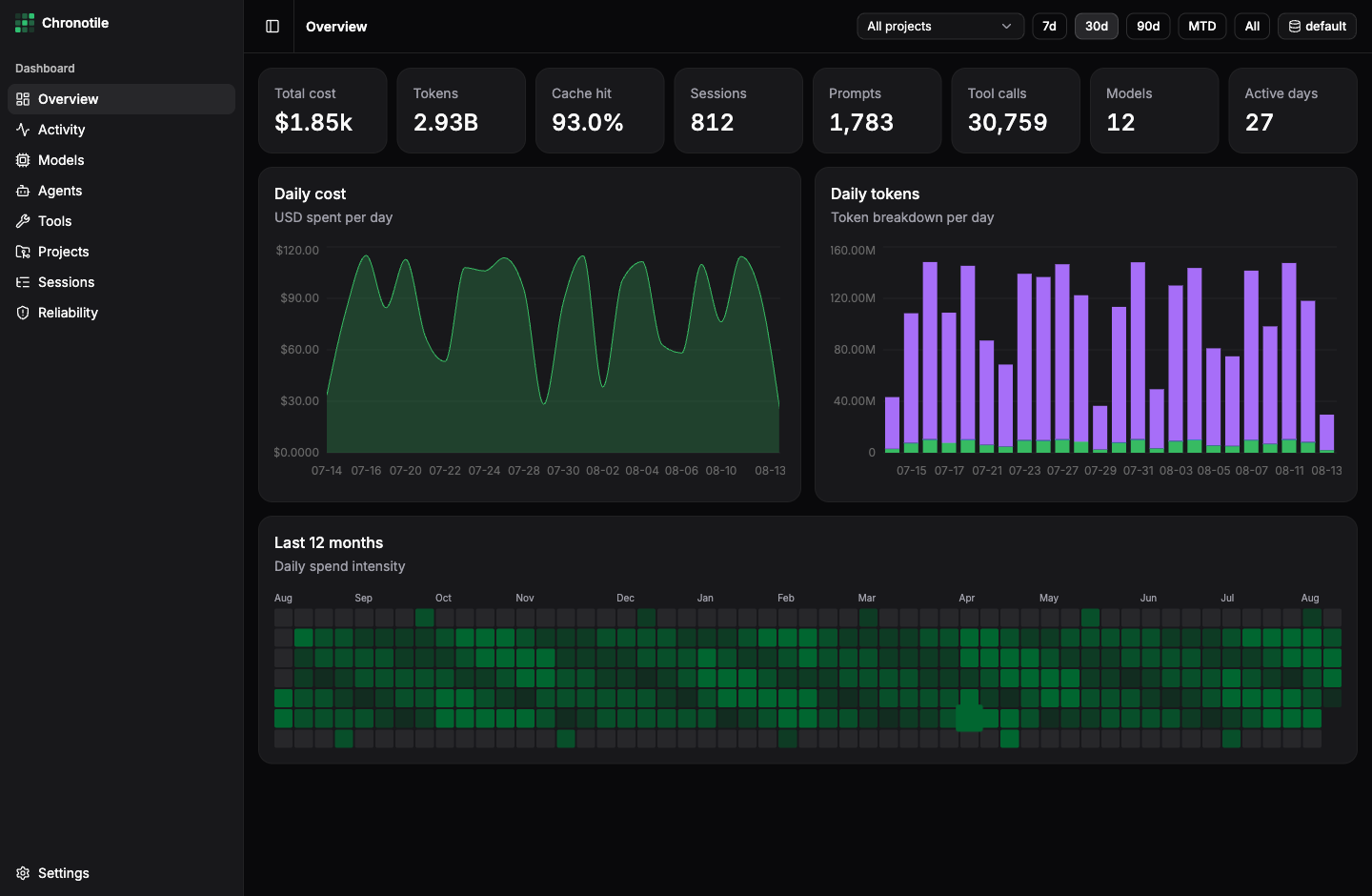
Just made legible. Eleven pages, filterable by project and time range, down to a single session.
Spend, tokens (including reasoning and cache), models, agents, tools, skills, projects, sessions, and errors — filterable by project and by 7d / 30d / 90d / MTD / all time.
Subscription and OAuth-plan messages are stored as $0 — on a real database, most of them. Chronotile prices their tokens from models.dev and shows reported and estimated side by side.
An incremental rollup cache answers every query in milliseconds, no matter how large your history grows.
Your opencode databases are opened read-only — nothing is modified. No usage data ever leaves your machine; the app makes two requests, an update check and a public price list*.
Expand any session into its subagent children, then read the whole conversation: messages, tool calls with durations, reasoning, file patches, and errors.
A full year of daily spend or token intensity, always shown in full — with the range you picked highlighted and the rest dimmed.
Auto-detects the default opencode DB and lets you register any number more — e.g. per-profile databases from ocp. Switch with one click, or rebuild a source's index on demand.
Which skills actually get loaded, and how — preloaded by a task or invoked directly — with sessions, projects, and first/last use per skill.
Per-model and per-agent cost, tokens, and median output tok/s measured from your own traffic — expandable into each reasoning-effort variant.
Signed updates install from inside the app on macOS, Windows, and Linux AppImage. The launch check is silent unless a new version exists — and can be switched off.
The dashboard never touches your opencode database at query time. That's why it stays fast.
A Rust ingest engine opens each opencode SQLite database read-only and mirrors it into a compact local rollup cache — roughly 15 MB per 10 GB of sources.
Every cycle is an indexed range scan past a stored rowid watermark — never a full rescan. In-flight messages wait until their cost and tokens are final. A cycle runs every 60 s, or whenever you hit refresh.
The UI never queries opencode directly — it reads only from the local rollup, and polls the ingest status every 5 s so new data lands on its own. Instant, even alongside a running opencode.
Everything is local. opencode databases are opened read-only. Chronotile writes only to its own app directory. No telemetry, no accounts, no analytics.
releases/latest/download/latest.json. The second downloads
a public price list from models.dev — the same
api.json anyone can open in a browser — so subscription usage, which
opencode records as $0, can still be costed. Both send nothing but the
request itself: no usage data, no identifiers, no analytics, and there is no server
to send them to. The update check runs once at launch, silent unless an update is
waiting; the price refresh runs in the background at most once a day. Switch both off
under Settings → Preferences and the app makes no network calls at
all — a price snapshot ships inside the binary, so cost still works offline.